BIM standards packs
Each standards pack works on its own. Start with the one that fixes your biggest problem today.
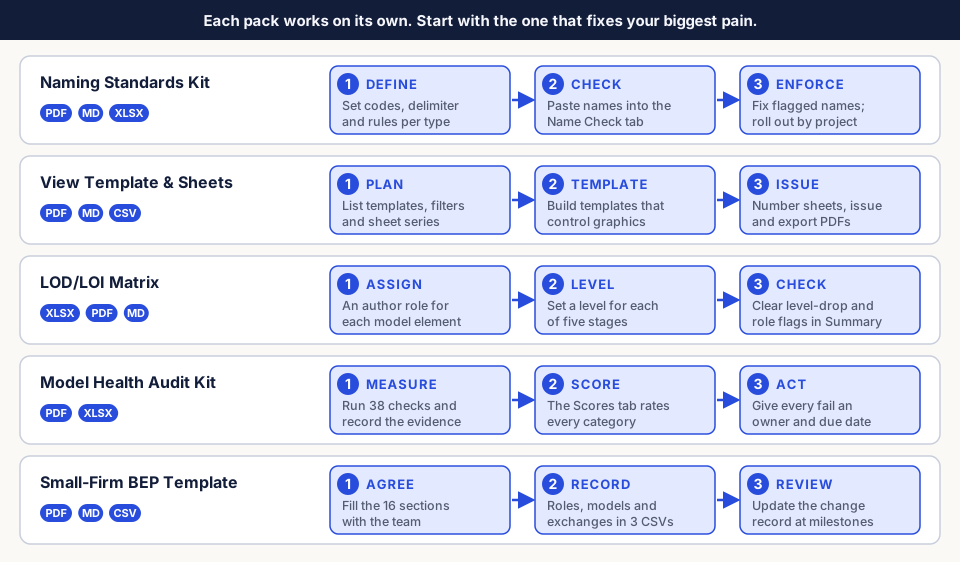
Revit Naming Standards Kit
Files: guide PDF and MD, Revit-Naming-Standards-Validator.xlsx
- Read the guide's field-based structure. Then edit Codes (disciplines and forbidden characters) and Rules (delimiter, field count, maximum length).
- Paste existing names into Name Check. Each row shows OK or the first problem found.
- Use Summary to see problems by object type. Roll fixes out project by project.
View Template and Sheet Standards Guide
Files: guide PDF and MD, View-Template-Register.csv, Filter-Register.csv,
Sheet-Register.csv
- Plan the set in the three registers: templates, filters and sheet series.
- Build templates that control scale, detail level and filters, so views need no per-view fixes.
- Number and name sheets from the register, then issue and export with the guide's checklist.
Model Element Responsibility Matrix (LOD and LOI)
Files: Model-Element-Responsibility-Matrix.xlsx, guide PDF and MD
- Set Levels and Stages and Roles for your project.
- In Matrix, give each element an author role and a level for each of five stages. List required parameters in Information.
- Clear the problem counts in Summary, then agree the matrix with the team.
Revit Model Health Audit Kit
Files: audit guide PDF, Model-Health-Scoring-Workbook.xlsx
- Run the 38 checks in the guide. Record each result and its evidence on the Audit tab.
- Read category and overall ratings on Scores. Adjust points in Settings only by agreement.
- Give every fail an action, owner role and due date. Log raw numbers in Metrics Log to compare audits.
BIM Execution Plan Template for Small Firms
Files: template PDF and MD, BEP-Roles-Register.csv, Model-Register.csv,
Information-Exchange-Schedule.csv
- Fill in the 16 sections of the Markdown copy with the project team.
- Record roles, models and information exchanges in the three CSV registers.
- Review the plan at each milestone and log changes in the change record.