Detail migration packs
Use these packs to move a legacy CAD detail library into clean, native Revit details. On a project, work through them in the order below.
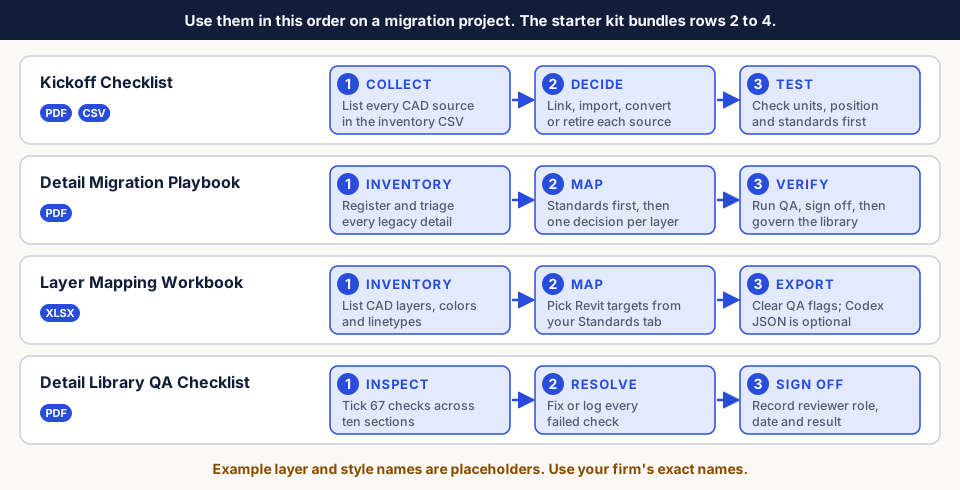
CAD-to-Revit Kickoff Checklist
Files: checklist PDF, CAD-Source-Inventory.csv
- List every CAD source in the inventory CSV: origin, units, coordinate basis.
- Record a decision and owner role for each source.
- Work through the eight checklist sections before modeling starts, then complete the sign-off record.
Detail Migration Playbook
Files: playbook PDF
- Build a detail register. Classify each detail as Keep as-is, Convert, Redraw natively or Retire.
- Set line styles, text types and filled region types before converting.
- Choose a conversion method with the decision matrix, run a pilot, then QA.
Layer Mapping Workbook
Files: CAD-Layer-to-Revit-Standards-Mapping-Workbook.xlsx
- Layer Inventory: one row per CAD layer.
- Standards: your exact Revit line style, text type and filled region type names. These feed the dropdowns.
- Layer Map: choose Map, Skip or Review and a Revit target for each layer.
- Exceptions & QA: bring every count to zero.
The optional Codex Export tab builds the same JSON shape Codex reads. Copy
it into a plain-text editor and save it as a .json file. See
Create a mapping. The workbook is useful without Codex
too.
Detail Library QA Checklist
Files: checklist PDF
- Inspect each converted detail against 67 checks in ten sections, from geometry and text to library governance.
- Fix each failed check, or log it as an exception.
- Record the detail ID, revision, reviewer role, date and result in the sign-off record.